Process Overview
Thanks to the generosity of our donors and the foundation’s endowment, we are proud to offer grant opportunities for nonprofits that are dedicated to addressing our community’s most pressing challenges through innovation, commitment, and enthusiasm.
To apply for a grant, please follow these steps:
- Review the available Grant Opportunities.
- Determine the program/s or initiative/s for which you are eligible and to which you would like to apply.
- Carefully review the grant guidelines and read through the Eligibility Criteria and FAQs.
- Contact the community engagement team member listed with the relevant grant program if you still have questions or wish to discuss a specific project.
- Review and follow the online application & submittal procedures (see below).
Application and Submittal Procedures
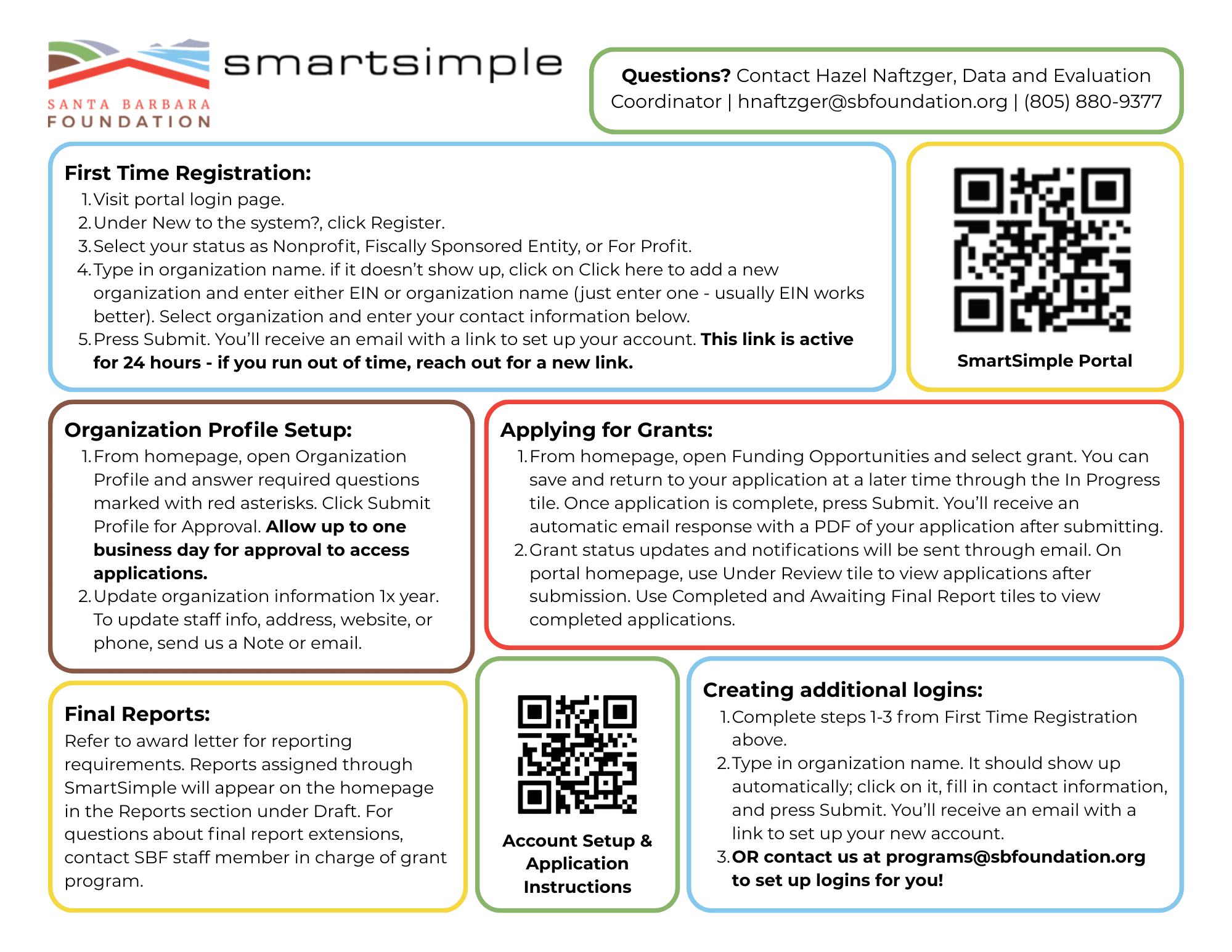
CLICK HERE FOR A DETAILED VIDEO OF THIS PROCESS, AND/OR CLICK HERE TO DOWNLOAD A PDF COPY OF THE INSTRUCTIONS
For first time applicants (no existing profile in SmartSimple)
- Visit the portal here.
- Click on the blue Register button under “New to the System?”
- Select status as Nonprofit, Fiscally Sponsored Entity, or For Profit.
- Begin typing your org name into the Organization Name box. If it shows “No Records Found”, click on the link in the blue box above this section to add a new organization.
- Enter only ONE of the following and press search: (do not enter both, this will return no results).
- Org EIN without dashes or spaces
- Organization name
- Click on your organization name in the Organization Results screen.
- Fill in your contact information and press submit. Make sure to use an email that you have access to, because you will receive emailed links to set up your account.
- You will then receive an email prompting you to create a password and finish setting up your account.
Orgs new to the system will need to add information to Organization Profile before beginning grant applications. This includes staff/board/financial/other org information – required fields are marked with a red asterisk.
Adding an individual contact to an existing org profile
- Visit the portal here.
- Click on the blue Register button under “New to the System?”
- Select status as Nonprofit, Fiscally Sponsored Entity, or For Profit.
- Begin typing your org name into the Organization Name box. It should pop up automatically; when it does, click on it.
- Fill in your contact information and press submit. Make sure to use an email that you have access to.
- You will then receive an email prompting you to create a password and finish setting up your account.
DEADLINES: All applications must be received by 5PM on the deadline date noted for each grant program on the grant opportunities page. Please carefully review grant guidelines and read through Eligibility Criteria and FAQs. Paper applications are not accepted.
If you are experiencing technical difficulties with your application or submission, please contact Hazel Naftzger, Data & Evaluation Coordinator, at 805-880-8377 or hnaftzger@sbfoundation.org
APPLY NOW THROUGH SBF'S ONLINE PLATFORM


 Santa Barbara Foundation LOGO